Runs inside your Microsoft 365

Run your whole estate, not just inspect it.

EstateProof is a set of connected apps for reporting faults, managing work, running statutory inspections and proving compliance, all inside your own Microsoft 365, with your data staying in your tenant.

Your records never leave your Microsoft 365. One sign-in, no per-seat fees.

Not sure where you stand? Take the free three-minute compliance assessment — scored on the spot.

app.estateproof.co.uk · Dashboard

Compliance overview

96% compliant
12Sites
145Inspections
38Actions
8Overdue
Actions by priority
High
18
Medium
13
Low
7
Inspect

Fire safety

7 / 20
Fire doors closing fully and unobstructed?
Yes, compliant
No, raise action
One connected suite

The whole loop, not just the checklist

Someone reports a problem, the right person gets the job, the work gets done and signed off, and leadership can see it's all under control.

Report

Requester

Any member of staff reports a fault in seconds by app, Teams or email, and sees only their own requests, in plain language.

Manage

FM Hub

Your site manager triages every request, including ones emailed or messaged in and drafted into jobs automatically, then runs planned and statutory maintenance from one screen.

Do

Site Team

Site staff get their jobs on their phone, add before and after photos, and flag anything that needs a contractor.

Inspect

Inspect Gold

Fire doors, gas, electrical, water and more on templated checklists. A failed check automatically becomes a tracked job, with a photo and a risk rating.

Govern

Trust Dashboard

Leaders get a live, read-only view of compliance, overdue work and contractor insurance status across the whole estate.

Board

Governance In development

Board packs, e-signed approvals and audit-ready records — connected to your live estate data. Explore Governance

One data layer

Everyone sees only their app

Someone reporting a leak never sees contractor, cost or other staff detail. Five role-based apps, one set of records, and a simple answer for your data protection officer.
The part nobody else does

AI that reads the fault before you do

A photo of a broken window becomes a drafted job — category, priority, description, safety warning. An urgent email about a gas smell arrives with the site, location, impact and access contact already filled in, flagged P1, contractor suggested. You review and click. The AI drafts; people decide.

Unmetered and included with Gold — no per-photo charges, ever.

URGENT — strong smell of gas near kitchen servery

Extracted in the time it took to arrive:
Site: Riverside Academy · Priority: P1 · Emergency
Category: Gas / Heating · Location: Kitchen servery, dining hall
Impact: Dining hall closed — pupils relocated
Access: 01234 567204 (school office)

→ Create work order
Watch the tour

See EstateProof in action

Ninety seconds, real screens, real clicks: a photo becomes a drafted job, a gas-leak email becomes a P1 work order, the asbestos guard locks a job until it’s acknowledged, and the trust sees the evidence. Then click around it yourself.

Book a live demo Try it yourself, live
Your data stays yours

It runs in your Microsoft 365. We never hold your data.

Every work order, photo, inspection record and audit trail is written into your own SharePoint, on your tenant. Your team signs in with the Microsoft account they already have. No separate platform, no new password, no third-party cloud.

  • Your IT grants consent once and can revoke it any time.
  • Nothing new for IT to vet. It uses your existing sign-in and permissions.
  • Leave whenever you like and keep everything. It was always yours.
Leadership Dashboard · Compliance
12Sites
145Inspections
38Actions
8Overdue
Actions by priority
High
18
Medium
13
Low
7
Who it's for

Anyone who runs buildings and has to prove it

Education, housing, commercial property, estates and facilities teams. Our live demo runs on a school estate, and the product fits any portfolio.

Education Housing Commercial property Estates teams Facilities management Fire safety Gas & electrical Water / Legionella Health & safety Grounds & communal areas Statutory compliance
How it works

From reported to resolved in four steps

1

Report or inspect

Staff report a fault, or a member of the site team runs an inspection on site, online or fully offline.

2

Triage

Requests land in one queue. Emails and Teams messages are drafted into jobs automatically for your site manager to confirm.

3

Assign and do

The job goes to the right person or contractor, with photos and access details attached.

4

Prove it

Every action is logged, and leadership sees compliance across the estate at a glance.

In the field

Off the paperwork, onto the phone

Illustrative examples. Real customer references available on request.

★★★★★

"Inspectors open the app on site, even with no signal, and everything syncs back to our SharePoint when they're in range. We binned the paper forms overnight."

OD
Operations DirectorMulti-site education estate
★★★★★

"What sold us was that it runs in our own Microsoft 365. No new vendor, no data leaving our tenant, and IT didn't have to vet another platform."

HC
Head of ComplianceHousing association
★★★★★

"Every member of staff can report a fault and it doesn't cost us more. The pricing is refreshingly honest, with no per-seat surprises at renewal."

EM
Estates ManagerLocal authority portfolio
Honest pricing

One published price. Held.

Silver from £750 and Gold from £1,295 per school per year, ex VAT — unlimited users, AI included, annual contract with sixty days' notice. No modules, no per-seat fees, no discount theatre. Put your estate size into the calculator and see your number next to the comparable Every and iAM Compliant quotes.

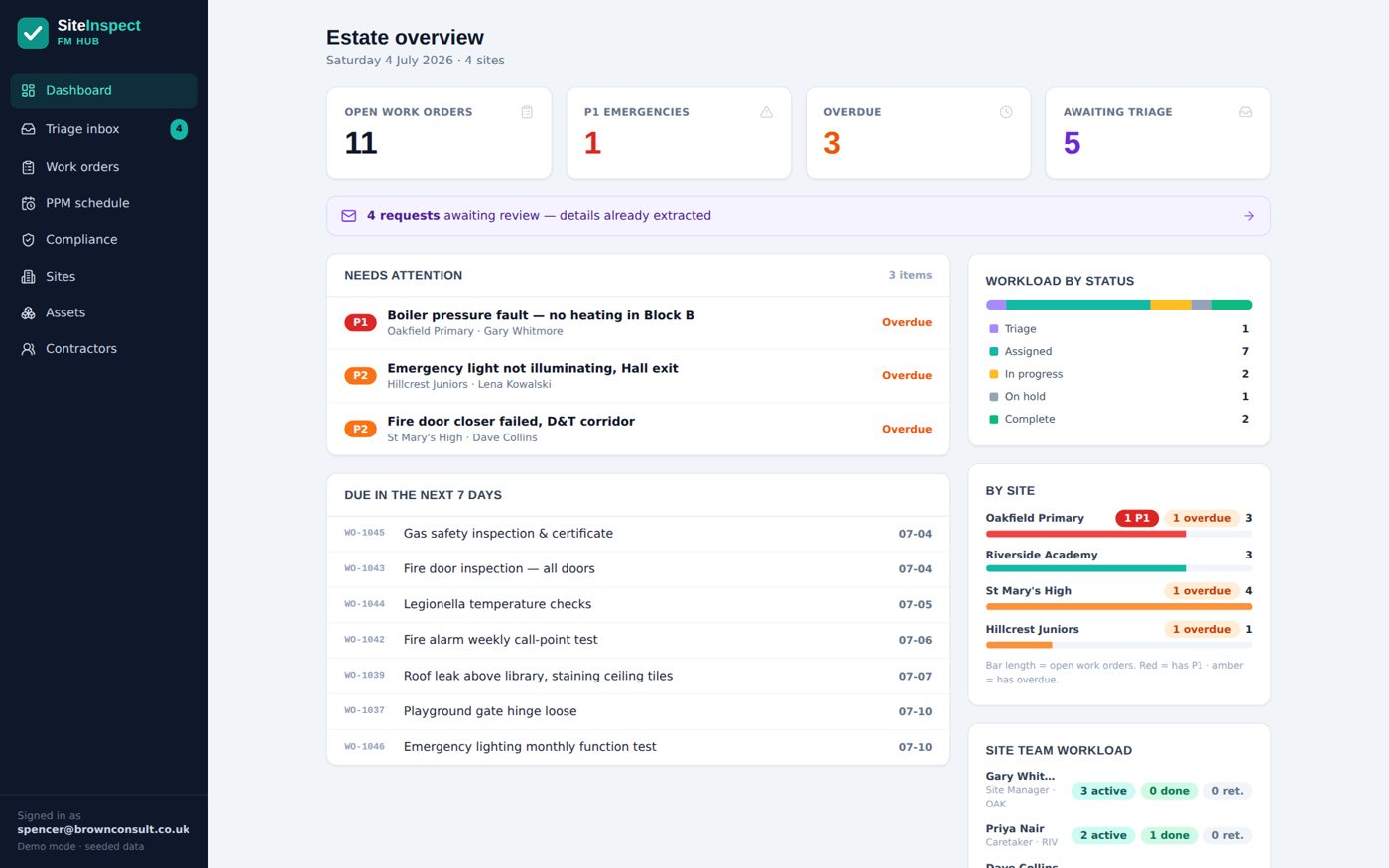
The EstateProof FM Hub — the whole estate on one live screen

Ready to run your estate from one place?

See EstateProof running inside a Microsoft 365 just like yours. About 30 minutes, no hard sell.